
How to set up a Google Business Profile when you work from home or on the road
17 November 2026
You finish a job, pack the van, and the neighbour leans over the fence to ask who did the work. You tell her. That night she searches your business name on Google Maps and nothing comes up. She books the bloke who does show up.
Most tradies and mobile businesses I talk to have the same worry about Google: "I work from home, I don't want my address on the internet." You don't have to put it there. Google has a setting built for exactly this. Here's how to set the profile up properly the first time.
How do I set up a Google Business Profile if I don't have a shopfront?
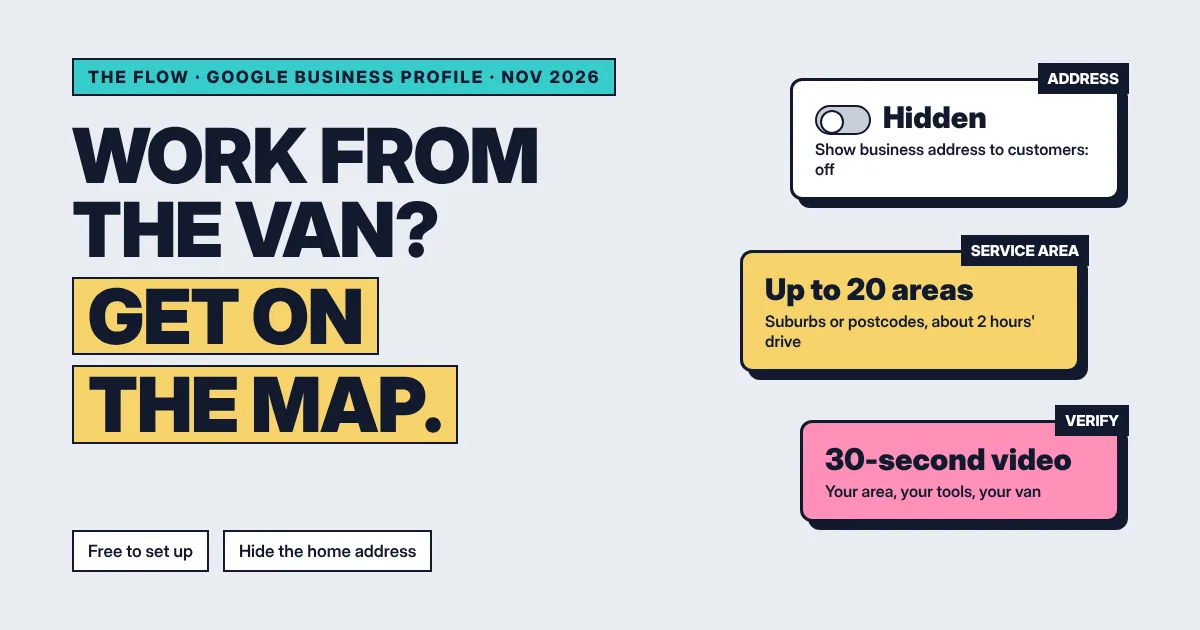
Go to business.google.com/add and add your business under the name you actually trade as. Tell Google you visit customers, then hide your address and list up to 20 suburbs or postcodes you serve. Verify, usually with a short video from your phone. It's free, and Google says reviews take up to five working days.
- Use a Google Account you'll keep. Set it up on an account the business owns, not a staff member's personal one. It doesn't need to be Gmail. Google lets you create the account with your own email address (Google's add or claim guide).
- Add the business. Go to business.google.com/add, click Add your business to Google and follow the steps. If your business already shows on Maps, claim it instead of making a second one.
- Use your real name, nothing extra. Google wants the name you use on your van, website and invoices. No suburbs, keywords, phone numbers or taglines tacked on (Google's guidelines).
- Pick one primary category. Choose the one that finishes the sentence "This business is a". You can add up to nine more, but Google says to use as few as possible, and categories affect where you show up (categories).
- Hide your address. Enter where you're based so Google can verify you, then go to Edit profile, Location, select Edit next to Business location and turn off Show business address to customers (manage your address).
- Set your service areas. In Edit profile, Location, select Edit next to Service area and add the suburbs or postcodes you cover. Google allows up to 20, doesn't allow a radius, and says it shouldn't be more than about two hours' drive from your base. Changes can take up to 48 hours to show (service areas).
- Verify. Google chooses which verification options you get. For most service-area businesses that includes a short video, covered below.
One thing to know before step 5: if you hide your address and don't add a service area, Google picks a local area for you. Set your own so it matches where you actually work.
Shopfront, service area or both: which one are you?
| Type | Customers come to you? | Address on Google | Service area |
|---|---|---|---|
| Shopfront | Yes | Shown | Not needed |
| Service-area business | No, you go to them | Hidden | Up to 20 suburbs or postcodes |
| Hybrid | Yes, and you also travel | Shown | Added as well |
A plumber running the business from home is the example Google itself uses for hiding the address. A salon that also does mobile bridal hair is a hybrid: show the salon and add the areas you travel to.
What do I film for Google's verification video if I work from home?
Google's video check is a live, unedited recording of at least 30 seconds, taken on your phone in one go. For a service-area business it needs three things: where you're based, the tools of your trade, and proof the business is yours. Pre-recorded or edited clips aren't accepted (Google's video verification guide).
- Your location. A street sign or landmark near your base, so Google can match the area. Google says to avoid filming empty land.
- Your tools or equipment. The gear you work with: the ladder rack, the mower, the kit in the back.
- Proof you run it. Google's own example is unlocking a van that carries your business branding. A business permit, invoice or utility bill in the business name also counts.
Keep bank, tax and ID numbers out of frame, along with other people's faces. On your phone, open your profile at business.google.com, tap Get verified, then Business video, then Start recording. Review it and upload. If Google rejects it, you'll see a notice telling you what was missing, and you can record again.
What if video isn't offered?
Google decides the options for each business, and they can't be changed. You might be offered phone or text, email, a live video call during opening hours, or a postcard. Postcard codes mostly arrive within 14 days and expire after 30. While you wait, don't change your name, address or category (verification options).
What can't a service-area business use as an address?
Google won't accept a PO box or a remote mailbox. A virtual office only counts if it's staffed during your opening hours, and a coworking space needs your signage, staff and customers received there. Keep one profile for the business, based where you actually work from, with your service area on top (Google's guidelines).
What should I fill in once I'm verified?
- The description. Up to 750 characters. Say what you do, where, and for whom. Google doesn't allow links in it, and it shouldn't be about prices or specials (edit your profile).
- Photos of real jobs. Your work, your van, your team. People hire who they can picture turning up.
- Your review link. Every profile has a free one. I've covered where to find it in review links, QR codes and cards.
- Careful with categories later. Google says adding or changing a category can ask you to verify again. Get them right on day one.
If you're a revenu client, connect the profile to your account so reviews land in one place and you can reply from there. It's one button, and the steps are in the help centre: connect your Google Business Profile.
Does the profile alone get me found?
It gets you on the map. Where you sit on it comes from what happens next, mostly steady reviews from real jobs. Peter at Northside Lawn and Property Care went from not showing up for his own name to first or second in the map across 15 suburbs in five weeks. That story is here.
Questions people ask
Is a Google Business Profile free?
Yes. Google says you can add or claim your business at no charge. The only cost is your time.
Do I need a Gmail address to set one up?
You need a Google Account, but it doesn't have to be Gmail. Google lets you create the account with your own business email address.
Can I hide my home address on Google?
Yes, if customers don't come to you. In Edit profile, then Location, turn off Show business address to customers. Your profile then shows your service area instead.
Why can't I verify with a video?
Google picks the verification options for each business and you can't change them. Online-only businesses can't use video, and pre-recorded or edited clips are rejected.
How long does Google verification take?
Google says verification reviews take up to five working days. Postcard codes mostly arrive within 14 days and expire after 30.
If you'd like the profile connected and the review requests going out after every job without you thinking about it, that's part of a standard revenu build. Book a chat and I'll walk you through it on your own business.
Keep reading