
Google review cards, QR codes and links: what's free and what actually works
10 November 2026
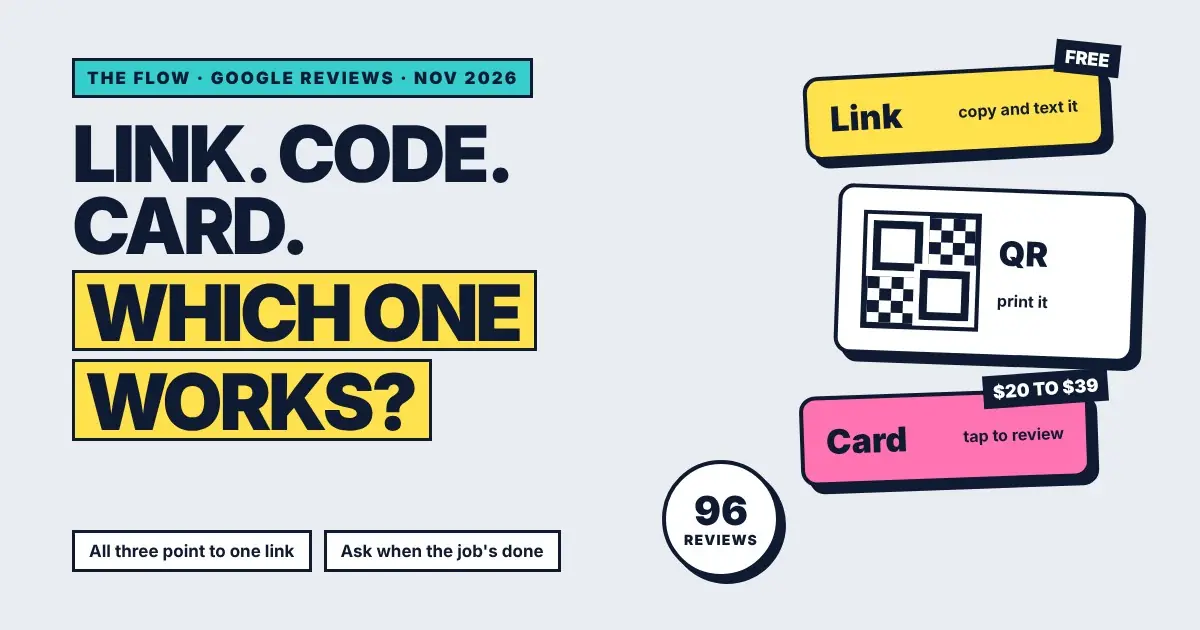
A customer is standing at your counter, happy. The job came out well. You say "if you get a chance, leave us a Google review". They say "for sure". You never hear about it again.
That's not a people problem. It's a friction problem. Somewhere between the counter and their phone, the review gets lost. Links, QR codes and tap cards all exist to close that gap. Here's what each one costs, how to get it, and which one actually brings reviews in.
How do I get my Google review link?
Open your Business Profile on a computer, go to Read reviews, then Get more reviews. Google shows your review link with a copy button, plus a QR code. The link is free, doesn't change, and opens the review box directly. Text it, email it, or put it in your booking confirmations.
- Search your business name on Google while signed in to the account that manages it.
- In your profile panel, click Read reviews, then Get more reviews.
- Click the copy icon next to the review link (1).
- For the QR code (2), right-click it and choose Save image as. This only works in a computer browser, not the phone app.
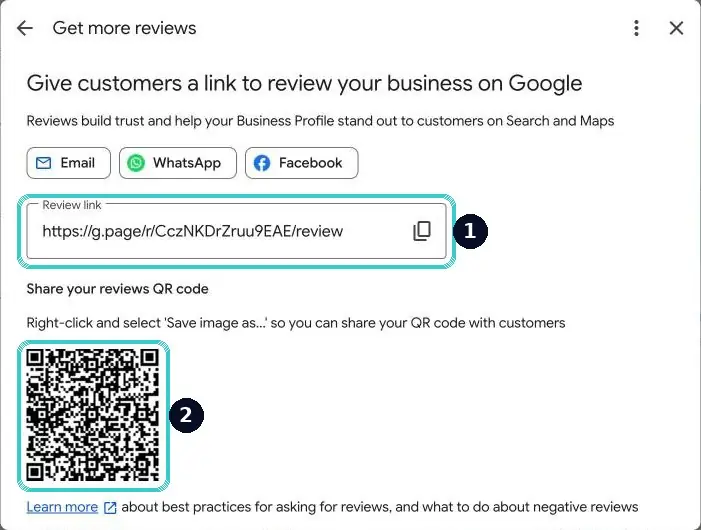
Google's own steps are here if your screen looks different.
Is a Google review QR code worth printing?
Yes, where people wait. A QR code on the counter, a receipt, an invoice or the back of a business card works because the customer already has their phone in hand. It's free from the same Get more reviews window. It won't do much on a wall nobody looks at.
Put it where the good moment happens. A salon puts it at the front desk next to the card machine. A tradie puts it on the invoice. A clinic puts it on the aftercare sheet.
Do NFC Google review cards work?
They work, but they're the same link in plastic. You tap the card to the customer's phone and the review page opens. In Australia they cost about $39 for one card, down to around $20 each when you buy ten or more. Most iPhones from 2018 on and most Androids can read them.
The card is good for one thing: making the ask feel easy in person. Tap, review page open, done. It's a nice touch at a counter. But it only works while the customer is standing in front of you, and most service jobs end with the customer gone. That's where most reviews are lost.
Google's help pages don't list a free review card. Any card you buy is a printed version of the link you already have for free.
Link, QR code or card: which gets more reviews?
| Option | Cost | Works when | Weak spot |
|---|---|---|---|
| Review link | Free | Sent by text or email after the job | Someone has to remember to send it |
| QR code | Free (plus printing) | Customer is waiting with their phone out | Ignored if it's not where eyes are |
| NFC card | $20 to $39 a card | Customer is at the counter, happy | Useless once they've left |
| Automatic text after the job | Part of your system | Every job, every time, nobody has to remember | Needs consent and an opt out |
The pattern is simple. The ask that goes out every time beats the ask that's clever. All three tools open the same link. What changes results is whether that link reaches every customer, at the right moment, without you thinking about it.
What does that look like in a real business?
Peter started Northside Lawn and Property Care in December. When we spoke in March, you could search his business name on Google and he didn't come up. No cards, no posters. When a job was done, the review request went out on its own, and the reviews followed the work.
Five weeks after we started, he was first or second in the Google map pack across 15 suburbs, with no ad spend. His competitors had years on the books and far more reviews. Steady, recent reviews from real jobs did the heavy lifting.
Alloy Fix did the same and went from 18 to 96 reviews in six months. I've written up that system in how to get more Google reviews without begging or bribing.
What should I text customers to ask for a review?
Keep it short, name your business, thank them for something specific, and include the link. Send it within a few hours of the job while it's fresh. Add a way to opt out. One text is enough.
Hi Sam, it's Mia from Bloom Studio. Thanks for coming in today, hope you love the colour. If you've got a minute, a quick Google review helps us a lot: [your review link]
Reply STOP to opt out.
Swap in your own name and the job. Keep it sounding like you'd say it at the counter.
What about customers from the last year?
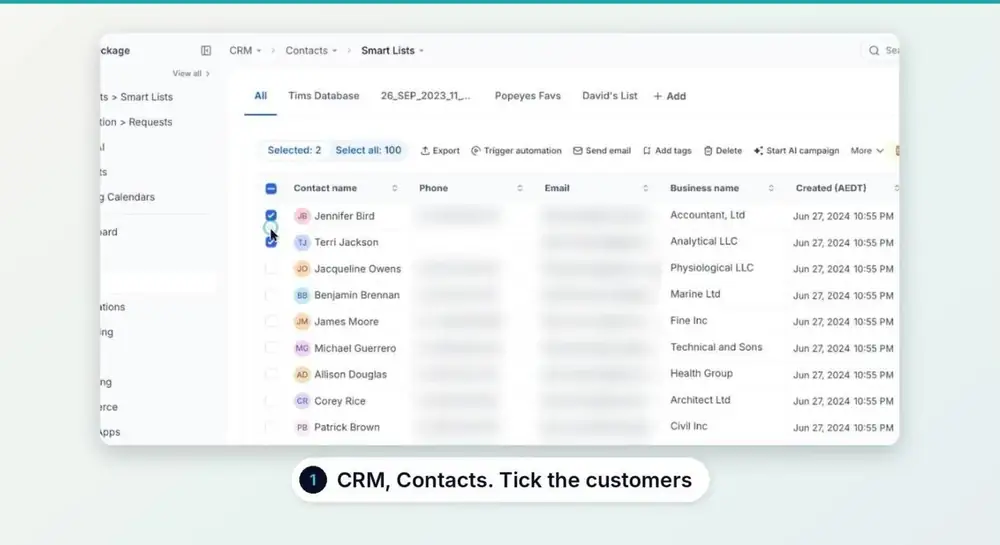
You can catch up past customers once. Pick the ones you've worked with recently and send the same message with a line saying you're asking everyone you've worked with this year. Only text people who gave you their number as customers, and keep the STOP line in.
What are Google's rules for asking for reviews?
Ask everyone, not only the happy ones. Never offer a discount, gift or prize draw for a review. Google treats incentivised reviews as fake engagement and can remove them or restrict your profile. Don't write reviews for yourself or ask staff to.
- No incentives, even small ones. A coffee voucher for a review breaks the rules.
- No filtering. Sending the link only to customers you expect five stars from counts as selective asking.
- Reply to every review, good or bad. It shows the next person you're paying attention.
The full list is in Google's prohibited and restricted content policy.
Questions people ask
Is a Google review link free?
Yes. Every Business Profile has one, under Read reviews, then Get more reviews. It costs nothing and doesn't expire.
Does Google send free review cards?
Google's Business Profile help doesn't list one. Paid NFC cards in Australia run about $20 to $39 each and open the same link you already have for free.
Why can't I save the QR code on my phone?
Google only offers the save option for the review QR code in a computer browser. Open your profile on a laptop or desktop and right-click the code.
How many review requests should I send?
One per customer, soon after the job. A single reminder a few days later is the most it needs. More than that starts to annoy people.
If you'd like every finished job to ask for the review for you, with the timing and the opt out handled, that's part of a standard revenu build. Book a chat and I'll show you on your own business.
Keep reading